|
|
| Home |
|---|
Learn how to print multiplication table in R from 1 to 10 of user entered number. Application of for loop and user input are explained here.
# This R Program prints Multiplication Table from 1 to 10
# For loop is used and take input from the user
number <- as.integer(readline(prompt = "Please Enter a Number for Table"))
# For iterating from one to ten, for loop is used
for( t in 1:10)
{
print ( paste ( number, '*', t, '=', number * t))
}
and the output is
[1] "3 x 1 = 3"1. number: It is the variable which will store value entered by user for multiplication table.
2. as.integer( ): This function will convert the value entered by user from string to integer.
3. readline( ): It is used to take input from user.
4. prompt: This is the prompt or line of text to guide user what to enter and for what purpose.
5. for: It is keyword here for executing for loop in program.
6. print: This function is used to print on console.
7. paste: paste function is used to concatenate text and variables seperated by commas
1. Write a program to write multiplication table of a number from 1 to 20.
2. Write a program to write table from 5 to 15.
3. Write a program to write table of any decimal number.
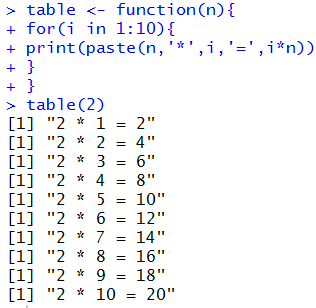
You can write a function and then call it again and again to write multiplication tables of different numbers. Can you write a program to write tables of numbers from 1 to 20? Try it.
Here is a table function example in RStudio