
|
|
| Home |
|---|
Learn how to write if statement and if...else statement in R programming with Examples and Flowchart.
Conditional statements form the building blocks of any programming language for decision making. In R programming a conditional statement consists of atleast one test condition which is a boolean expression that evaluates in to either True or False which forms the basis of execution or non execution of certain code. This is done in R using if & if...else statement.
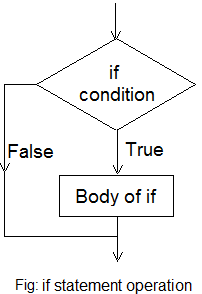
if statement is used when there is only one test condition and on the basis of that you have to take a decision. First the condition is checked. If the boolean expression results in to True the body of if statement is executed, otherwise R code in the specific block is skipped.
The syntax of if statement is
if (test condition) {
body of if
}
Now in case test condition is True, body of if is executed. When test condition is false the code in the body is ignored.
You can see the idea here in flowchart.
score <- 70
if (score > 50){
print('PASS')
}
When you write the code in rstudio it will be like
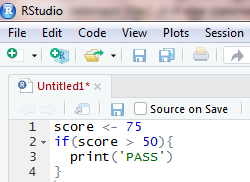
and the output on rstudio is
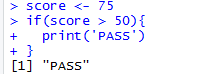
As the score is 75, hence the condition will result in a True and it will execute the code in the body of if statement i.e. it will print "PASS" on console.
The basic syntax for creating an if...else statement is
if (condition) {
//code to be executed if condition is True
} else {
//code to be executed if condition is False
}
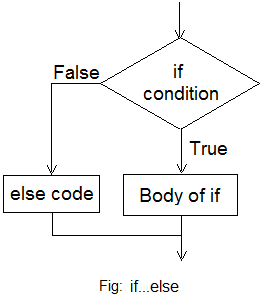
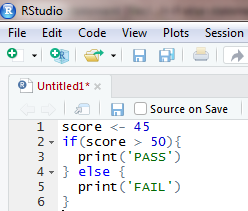
Here we are adding else code in the previous example.
score <- 45
if ( score > 50){
print("PASS")
} else {
print("FAIL")
}
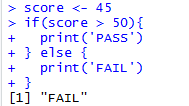
This code can also be written in a single line
>if (score > 50) print('PASS') else print('FAIL')
if else in R programming allows us to use this statement in this way also
>age <- 19
>status <- if(age > 18) "Adult" else "Child"
>status
>[1] "Adult"
First we are assigning 19 to a variable named age
Then we are creating a new variable status, however the value assigned to it depends on a condition. If the age variable is more than 18 then "Adult" will be assigned to status, otherwise "Child" will be assigned to it. In our example the variable age is 19, hence status will be assigned "Adult" string, which is shown in output. This construct makes the code neat and more readable.
This method can also be used with if statement also
>score <- 55
>Grade <- if(score > 50) "PASS"
>Grade
>[1] "PASS"
The syntax of if...else if...else is
if (condition no 1) {
//code to be executed if condition no 1 is True
} else if(condition no 2) {
//code to be executed if condition no 2 is True
} else if(condition no 3) {
//code to be executed if condition no 3 is True
} else { // code to be executed if all conditions are False
}
Here only one block of code will be executed depending on the condition.
You have to write an R program which outputs grade when score is given to it. Lets see how it will be done and also the output using rstudio
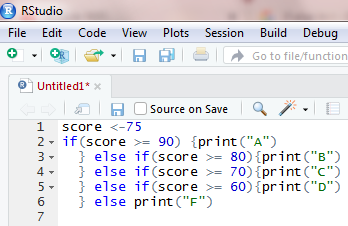
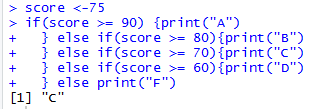
You can see the output is "C" which is correct. You may write this program, change score to 95, 82,60 and 45 and see what is the output of the code. There are 5 possible output and you should check to see if the program is working fine. This is testing your code and debugging it for any logical errors.
After this tutorial you should be able to understand decision making in R programming which consists of if statement, if...else statement and nested if statement. These statements form the core of R programming practise variety of code exercises to have grasp over these constructs.